

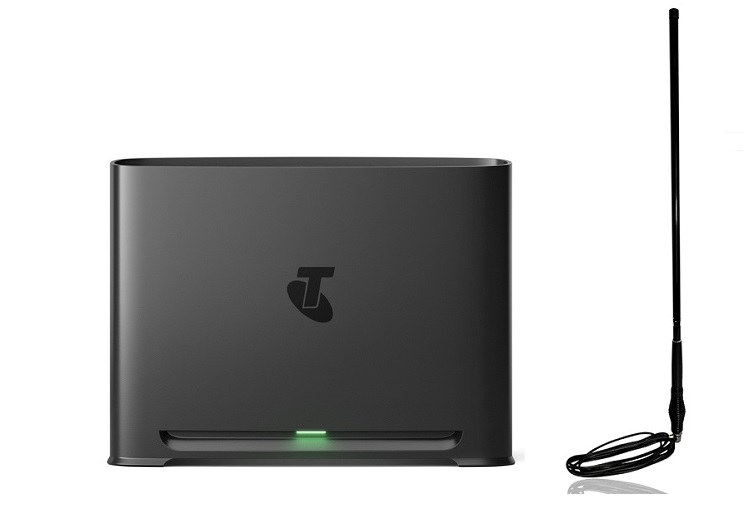
The Telstra Smart Modem 4 is a Wi‑Fi 7‑enabled, dual‑band router that delivers high‑capacity connectivity for modern smart‑home environments. While its internal Wi‑Fi antennas handle the primary NBN link, the device also offers dual SMA ports for external antennas that boost the 4G/5G backup signal. Understanding how to select, install and optimise these antennas can make a noticeable difference in reliability, especially for customers in fringe or rural locations.
Core Features of the Telstra Smart Modem 4
| Feature | Benefit |
|---|---|
| Wi‑Fi 7 (802.11be) | Faster throughput and smoother handling of many simultaneous devices. |
| 5G/4G Backup | Automatic fail‑over to Telstra’s mobile network when the NBN drops; 5G provides lower latency. |
| Device Capacity | Engineered to support over 250 concurrent connections. |
| EasyMesh Compatibility | Works with Telstra Smart Wi‑Fi Boosters for expanded coverage. |
| WPA3 Security | Stronger encryption for home networks. |
| SmartFix | Detects and assists with network faults on eligible plans. |
| Physical Ports | Four LAN ports for wired devices. |
Why External Antennas Matter
The built‑in Wi‑Fi antennas are optimised for the NBN connection and indoor coverage. The external SMA ports, however, are dedicated to the cellular backup path. Adding a high‑gain antenna can:
- Increase signal strength from the nearest Telstra 4G/5G tower.
- Reduce latency and packet loss during backup mode.
- Provide a more stable connection in areas with weak cellular coverage.
Types of Telstra Smart Modem 4 Antennas
| Antenna Type | Typical Gain | Ideal Use‑Case |
|---|---|---|
| Panel / Directional Antenna | 8–12 dBi | Locations with moderate signal that need a focused boost. |
| Yagi Antenna | 12–18 dBi | Very low‑signal environments; long‑range line‑of‑sight to the tower. |
| MIMO Dual‑Band Antenna | 6–10 dBi per element | Situations where both 4G and 5G bands require reinforcement. |
| 4G Smart Antenna (Telstra‑approved) | Proprietary gain | Indoor/outdoor hybrid deployments; requires Telstra assessment. |
Third‑party retailers such as Campad Electronics stock compatible MIMO antennas that match the modem’s dual SMA connectors.
Installing External Antennas on the Telstra Smart Modem 4
- Choose the Right Antenna: Assess signal strength using a mobile device or a field‑strength meter. Panel antennas work well for moderate signal; Yagi units are better for very weak reception.
- Mount the Antenna Outdoors: Secure the antenna on a pole, roof or wall, ensuring a clear line of sight to the nearest Telstra tower.
- Orient the Antenna: Align the antenna’s main lobe toward the tower (usually indicated by a compass bearing or a signal‑strength app).
- Connect via SMA Cables: Use low‑loss RG‑174 or LMR‑400 coaxial cable; keep cable length under 10 m to minimise loss.
- Secure the SMA Connectors: Tighten the connectors firmly but avoid over‑torquing, which can damage the threads.
- Power Up and Test: After connecting, power the modem, enable backup mode in the admin portal and verify improved signal levels and throughput.
Tip: If the modem’s status lights remain amber after installation, re‑check cable integrity and antenna orientation.
Placement Recommendations for Optimal Coverage
- Central Location: Place the modem on a raised, open surface away from metal furniture, large appliances and thick walls.
- Avoid Interference: Keep the device at least 30 cm from microwaves, cordless phones and Bluetooth speakers.
- Mesh Integration: Pair the modem with Telstra Smart Wi‑Fi Boosters to extend coverage to dead zones, especially when using external antennas for backup.
Security and Firmware Updates
The Telstra Smart Modem 4 ships with WPA3 encryption and receives regular OTA firmware upgrades. Ensure the router’s admin interface is accessed via a secure password and that automatic updates are enabled to protect both the primary Wi‑Fi network and the backup cellular link.
Cost Overview
- New Telstra Customers: Free with a qualifying plan.
- Existing Telstra Customers: $240 one‑off purchase price.
- External Antenna Investment: Varies by type; amgnetic base antennas start at $49.99, panel antennas start around $140, while high‑gain Yagi units can exceed $200 plus cabling costs.
FAQ – Telstra Smart Modem 4 Antennas
1. What kind of external antenna does the Telstra Smart Modem 4 support? The modem provides dual SMA ports that accept standard 2.4 mm SMA connectors, compatible with most 4G/5G panel, Yagi and MIMO antennas.
2. Will a panel antenna improve Wi‑Fi performance on the Smart Modem 4? No. The panel antenna only enhances the cellular backup link; Wi‑Fi performance is handled by the internal Wi‑Fi 7 antennas.
3. How far can I place the antenna cable from the Telstra Smart Modem 4? For minimal signal loss, keep the coaxial cable under 10 m (≈33 ft). Use low‑loss cable (LMR‑400) for longer runs.
4. Do I need a Telstra‑approved antenna for the Smart Modem 4? Any antenna that matches the SMA connector and operates on the required cellular frequencies will work, but Telstra‑approved models may be easier to register for service.
5. Can I use a dual‑band MIMO antenna with the Telstra Smart Modem 4? Yes. A dual‑band MIMO antenna can boost both 4G and 5G bands simultaneously, improving overall backup reliability.
6. How do I know which direction to point my external antenna? Use a smartphone signal‑strength app or a field‑strength meter to locate the strongest signal direction, then align the antenna’s main lobe toward that bearing.
7. Will adding an external antenna affect my data plan? The antenna only improves signal quality; it does not change the data allowance or speed caps of your existing cellular backup plan.
8. Is it possible to use the Telstra Smart Modem 4 antennas indoors? Indoor placement is possible for panel antennas in modest‑signal areas, but for best results the antenna should be mounted outdoors with a clear line of sight to the tower.
9. Do I need to configure anything after connecting an external antenna? Usually the modem auto‑detects the improved signal. If backup does not activate, verify the antenna connections and check the “Cellular Backup” setting in the admin portal.
10. Can I connect two separate antennas to the SMA ports? The two SMA ports are designed for MIMO operation; using a single antenna on both ports (via a splitter) is not recommended as it reduces diversity gain.
11. What maintenance does an external antenna for the Telstra Smart Modem 4 require? Periodically inspect the mounting hardware for corrosion, ensure the coaxial cable remains weather‑sealed and clean the antenna surface of dust or debris.